
Blog · Behind the scenes
Solo dev mistake log
One Alarm Used 5 Million Rows of the Daily Read Limit on Its Own: Tracing Durable Objects Error 1101
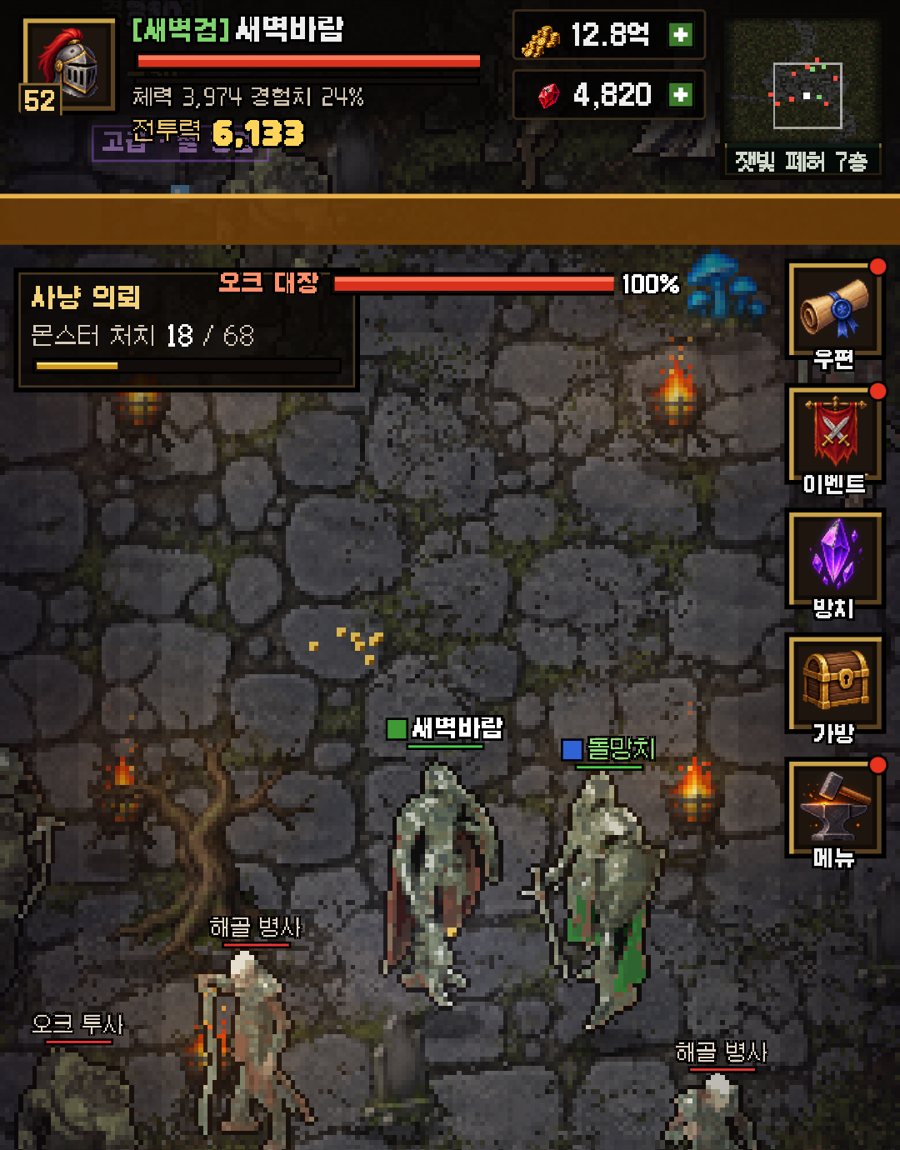
On November 7 my error collector started returning 500s, and the error code was 1101 with the message "Exceeded allowed rows read". The culprit was an alarm that runs every 5 seconds in a game server (Dot Clan) on the same account. That alarm scanned the users and feed tables without an index and used 4.98 million of the 5 million daily rows read by itself. The limit is shared across the whole account, so the invite server and the error collector went down with it. Two indexes and a 10 minute cache fixed it, and now an hourly check measures rows read per server and raises an alert with the culprit's name once usage passes 60%.
The Numbers First
When I realized the error collector was down, the first thing I did was gather numbers. I wanted to see what the limit was and who had read how much.
| Item | Number | Note |
|---|---|---|
| Daily rows read limit (free) | 5 million rows | Every server on the account shares it. Resets at 00:00 UTC (09:00 in Korea) |
| One Dot Clan alarm | 4.98 million rows | Total for November 7 |
| Times the alarm runs | 17,280 per day | Every 5 seconds. 86,400 seconds divided by 5 |
| Rows read per run | About 290 rows | Calculated value: 4.98 million divided by 17,280 |
| Error collector requests | 2,000 to 3,000 per day | Rows read were 1.4 million to 5.14 million per day |
I Suspected the Wrong Server First
The symptom showed up in the error collector first. Calling the session list and the issue list returned a 500, and the body said only error code: 1101. At the same moment the friend invite server was down with the same code.
The urgent alert banner named the invite server as the culprit. I had simply blamed whichever server had stopped. But the invite server gets only a few thousand requests a day, so it could not produce that many reads.
The error collector was the same story. It got 2,000 to 3,000 requests a day, yet it read between 1.4 million and 5.14 million rows. When requests and rows read are that far apart, someone else is doing the reading.
The Culprit Was a 5-Second Alarm
The limit is shared by the whole account, so I had to look at usage per server. I pulled rows read per server (Worker) from the Cloudflare API, and one of them accounted for almost all of it. It was the Dot Clan game server.
That server runs an alarm every 5 seconds. Inside the alarm, the queries that count the players online and read the bot list had no index on the users and feed tables, so each one scanned the table from the first row to the last.
About 290 rows per run looks small. But the alarm runs 17,280 times a day, and multiplied out that is 4.98 million.

What I Fixed
I fixed the Dot Clan server and the error collector separately. The cause was the same in both: queries that read a range without an index.
- Deploying the fix did not bring things back right away, because that day's limit was already used up. The error collector comes back at the next reset (00:00 UTC).
- With an index, the rows read per query drop from the size of the whole table to the number of rows actually needed.
| Server | What changed |
|---|---|
| Dot Clan | Two indexes: users(bot, seen) and feed(bot, ts) |
| Dot Clan | Cache the bot list in memory for 10 minutes |
| Error collector | Indexes on issues(last_at) and hits(day) |
| Error collector | Delete hits and sessions older than 90 days once a day |
So It Does Not Happen Again
Fixing it was not enough. This time I only found out after the limit was gone, and it took a long time to learn who was eating it. So I added two more things.
The first is a test. It collects the queries that run while the alarm fires 400 times, looks at their plans with EXPLAIN QUERY PLAN, and fails if even one query scans users or feed without an index. Queries with a LIMIT that stop early are excluded.
The second is monitoring. At minute 7 of every hour it adds up rows read per server, and if the total passes 60% of the limit it raises an alert with the culprit server's name and row count. It also pokes the invite server and the error collector directly, raises an alert if they return 1101, and clears it when they recover.
What I Got Wrong
The mistake was not one query. Several servers share one free limit, and nothing measured how much each server reads. When one server uses up the limit, a healthy server dies in its place, and you only see the one that died.
So I added a test to Dot Clan that checks whether the alarm path queries use an index. If the limit is shared by the account, a per-server usage table has to exist first, and that is what I learned this time.
FAQ
What does Cloudflare Durable Objects error 1101 mean?
It can mean you went over a free limit. In my case the body also said "Exceeded allowed rows read", and I had used up the daily rows read limit (5 million rows for the whole account).
Is the Durable Objects rows read limit per server or per account?
On my account, the whole account shared 5 million rows a day. When one server used almost all of it, two other servers stopped as well.
If I fix the server after the limit is gone, does it come back right away?
Not right away. Deploying the fix did not change that day's limit, so I had to wait for the reset at 00:00 UTC (9 AM in Korea).
How do I check whether an alarm scans a whole table?
Collect the queries that run inside the alarm and run EXPLAIN QUERY PLAN on them. If the plan shows SCAN followed by a table name with no index, it is reading the whole table.
More from the blog
 ComparisonOnsen and bathhouse games: 8 compared by what the store pages sayOnsen and bathhouse games from Steam, Google Play and the App Store in one table: price, rating, idle or not, Korean and Japanese support, plus the weak spots of our own game.
 ComparisonIdle tycoon games that work offline: 8 picks sorted by store labelsWhich idle tycoon games work offline? Google Play tag, store wording, list price and ads in one table, plus our own game's weak spots.
 Games likeFinished Kairosoft? 14 games to play next, sorted by what you lovedIf you have played through Kairosoft, here are 14 games sorted into four flavors: short grow-it sessions, running a shop, watching residents live, and layout puzzles. Steam list prices, review scores and UI languages checked by hand.
 ComparisonInternet Cafe Simulator Games in 2026: 17 Picks, iPhone IncludedLooking for an internet cafe simulator on iPhone, Android or Steam? We compared 17 games using prices, ratings and offline notes read straight off the store pages, plus our own game's weak spots.